Review Comments (0) Screenshots (2) Questions & Answers (1) Votes (9) Awards (3) Wiki  
(9)
2.4
www.highrez.co.uk
Freeware
497 people

The download link is unavailable now. Try visiting the developer's home page.

 
Video tutorial for X-Mouse Button Control 2.0
Frame
This video tutorial has been acquired from Downloadtube.com

Review

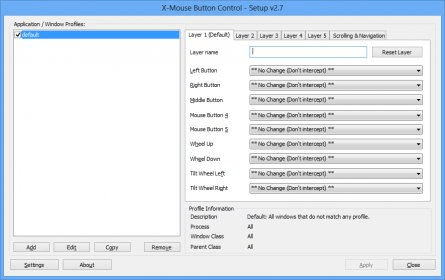
X-Mouse Button Control is a Windows application to remap your mouse buttons and expand the capabilities of your mouse!

You are able to provide application or window specific mappings, which means an application or window can use the mouse buttons differently from another. For each profile you can optionally define up to 5 'layers' of different button configurations which you can switch between using hotkeys or mouse buttons.

What's new in version 2.4

Add ability to translate XMBC to other languages. A new file type *.xmbclp is used to provide translations.
Added sticky change movement to scroll action.
Fixed problem with erratic mouse when left click is reassigned, noticed in Windows 7 snipping tool but I think also related to other eratic reports.
Added option to invert horizontal scrolling
Added option to configure default delays used in simulated keystrokes in the advance settings tab
(this is not related to {WAIT}/{WAITMS} tags).
Converted the application to use Unicode strings internally to support future work to include language selection.
Added ability to save/restore Windows 7 desktop gadget positions when saving/restoring desktop icon positions.
Added option to adjust/specify CPU priority.
Modified to reset sticky buttons on key press as well as any button (when general setting enabled) NOTE: In the future I intend to make this a separate setting (for keys and buttons).
Added check-box to only match windows profiles if the window has no parent.
Fixed chrome/iron web drop-down/combo box scrolling.
Fixed problem with BACK/FORWARD (APPCOMMAND keys) in Remote Desktop sessions.

What's new in version 2.3

Fixed a problem causing the active profile not to be highlighted in the setup window.
Fixed problem with "Scroll window under cursor" when tooltip windows popped up and blocked scrolling.
Added new simulated keystroke commands for toggling the state of num lock, caps lock & scroll lock:
{NUMLOCKON}, {NUMLOCKOFF}, {CAPSLOCKON}, {CAPSLOCKOFF}, {SCROLLLOCKON}, {SCROLLLOCKOFF}.
Fixed problem with simulated keystrokes RSHIFT, RCTRL and RALT in during/Sticky mode. #80 Installer deletes old files before replacing with new ones (for easy downgrade in the future).
Fixed problem not finding process/windows because the name was in the wrong case in the settings.
Fixed case sensitivity problem when highlighting profiles in setup dialog.
Fixed problem with minimize actions not working as expected.
Added window handle to window finder dialog.
Modified repeat detection to handle messages 0ms apart.
Reduced calls to GetProcessName to try and optimize the code.
Added Windows Key and Apps key to the dropdown selection of layer modifer keys.
Added a message to the setup screen when disabled via scroll lock or remote desktop (#90).
Added "Sticky Left button (Click Drag) X Axis" and "Sticky Left button (Click Drag) Y Axis".
Added option to disable XMBC when connected via RDP (remote desktop).
Added "Change movement to scroll" option (universal scroll?).
Fixed {SPACE} tag does not work in simkeys (during mode).
Report a wrong version Report a wrong program title Suggest a correction

Screenshots

Main window Main window Main Window Main Window

Latest comments


There are no comments, be the first one!
Add new comment

E-mail Address:

Password:

Register now »

Forgot password?

Sign in with:
Facebook Account
Download Software Informer Client
Copyright © 2012, Informer Technologies, Inc. About| Terms & Privacy| FAQ| Feedback & Support| For Developers